Frequently Asked Questions - Reviews
- Why is my review not visible online?After you submit a review, you must wait for your review to be approved by the administrators to check for credibility and relevance with the reviewed business. Once approved, your review would appear on the business local page.
There are a number of reasons why a member's review is retracted:
- The data does not appear to be accurate.
- The review is disrespectful or contains abusive language.
- The information is not helpful to the community and does not reflect the spirit of Top4.
- Can I remove a negative review?In order to maintain trust on our site, all reviews are checked for credibility by the Trust & Quality team before they are published on your profile. Negative feedback can thus be monitored and dealt with in a way that does not bring unnecessary slander to a business.
In case you feel that the review on your local page does not reflect positively on your business, please contact our support team at [email protected]. We are more than happy to look into it with you. - Can I transfer my reviews from other websites over to my local page?Yes, you can submit a review on behalf of a customer as long as the review has reliable source.
- Where is my review?Here at Top4 we curate reviews before they are posted. That process can take up to 24 hours depending on the current volume of reviews we receive.
If more information is needed from the reviewer for clarification, that could take a bit longer. If you have questions about a specific review you submitted, you can contact our support team at [email protected]. - How do I submit a review?The button to write a review is available on each Top4 local page. Click on "Write A Review" next to a thumb icon near the business logo. See picture below.
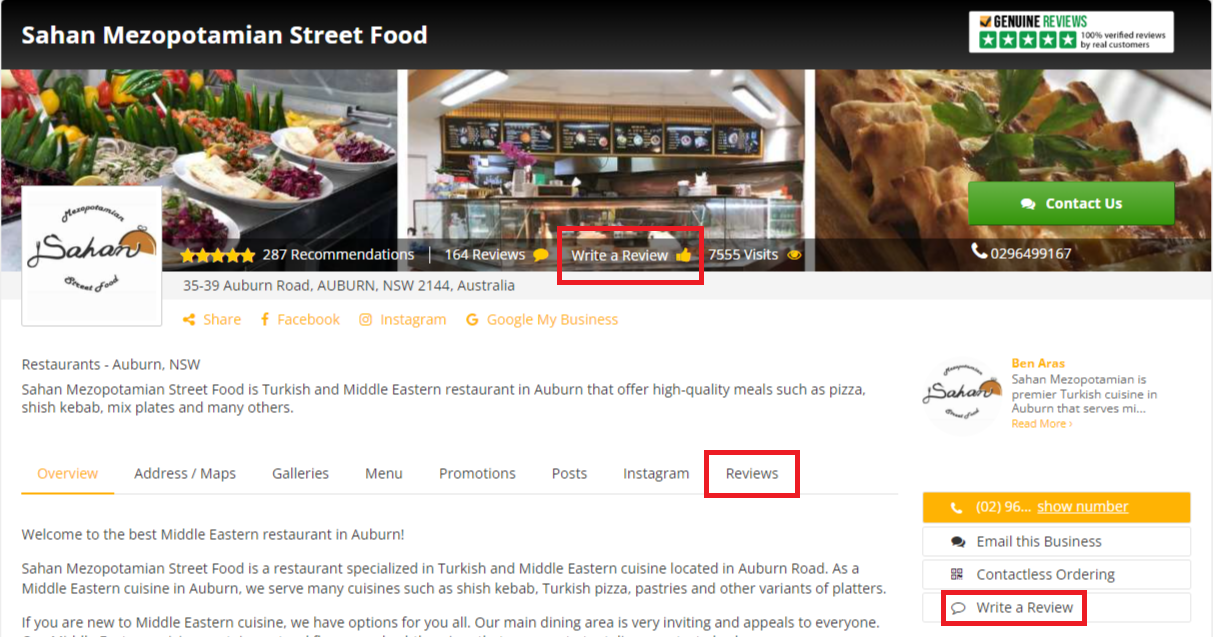
A pop-up will come out and you can fill out the forms with the corresponding details.
In the "Write a Review" pop-up, you will be asked to provide minor information and the main review content of the business.
After you write the review click submit and wait for your reviews to be approved by the administrators to check for credibility and relevance with the reviewed business.
Once approved, your reviews would appear on the local page.
Be sure to write an honest review for each local page.
Alternatively, go to the "Reviews" tab (in the rows of the "Details" tab) to directly write the review.